Managing Relationships & Campaigns
How to Manage Creators with ChatGPT and Claude
Learn how to organize creator relationships, connect your existing tools, and manage campaigns with ChatGPT or Claude.
TL;DR
ChatGPT and Claude can help manage creator relationships when connected to reliable records. Start by organizing your creators, campaigns, and deliverables in a spreadsheet, Notion, or purpose-built software. Connect your AI assistant, verify what it can read and update, and keep the underlying records as your source of truth.
AI assistants like ChatGPT and Claude have quickly become useful tools for researching ideas, planning projects, and working through everyday tasks. But what if they could do more than help you think about your creator marketing program? What if they could help you manage it?
For years, many creator marketing programs have started with a spreadsheet. And for good reason. Spreadsheets are accessible, flexible, and often more than enough to manage those first few creator relationships.
As programs grow, however, keeping track of campaigns, conversations, deliverables, and results becomes more complicated. Specialized creator marketing platforms have helped brands and agencies bring these workflows into more structured systems.
Now, AI assistants are introducing another possibility: making the tools teams already use more capable.
With the right setup, a spreadsheet can become more than a collection of rows and columns. Instead of manually searching through tabs, comparing records, and updating individual cells, marketers can use natural language to work with their information.
And this isn't limited to spreadsheets. AI assistants can also connect to tools like Notion and specialized creator marketing platforms, depending on the integrations available.
The idea is simple: your AI assistant helps you do the work, while your existing tools keep track of what happened.
Here's how to get started.
Step 1: Decide what creator information matters
Before connecting ChatGPT or Claude to anything, it's important to understand what information your creator program needs to track.
Imagine a brand working with 15 creators across two campaigns.
At first, managing these relationships might be relatively simple. You need to know who the creators are, how to reach them, and what they're expected to produce.
But as those relationships develop, more information becomes important.
Here are six useful categories to start with:
| Record | Information to track |
|---|---|
| Creators | Names, social profiles, email addresses, and contact details |
| Campaigns | Campaign names, goals, dates, and statuses |
| Creator partnerships | Which creators are participating in which campaigns |
| Deliverables | Expected posts, videos, deadlines, and completion statuses |
| Content | Published content, URLs, platforms, and dates |
| Activities | Emails, meetings, gifting updates, and follow-ups |
You don't necessarily need all six on day one. Start with the information you're already managing and expand as needed.
Think about how your records connect
One important consideration is that these records shouldn't exist in isolation.
For example, a creator might participate in two different campaigns. Each campaign could have its own deliverables, deadlines, gifting arrangements, and communication history.
Instead of duplicating the creator's contact information across multiple places, it's better to maintain one creator record and connect it to the campaigns they're involved in.
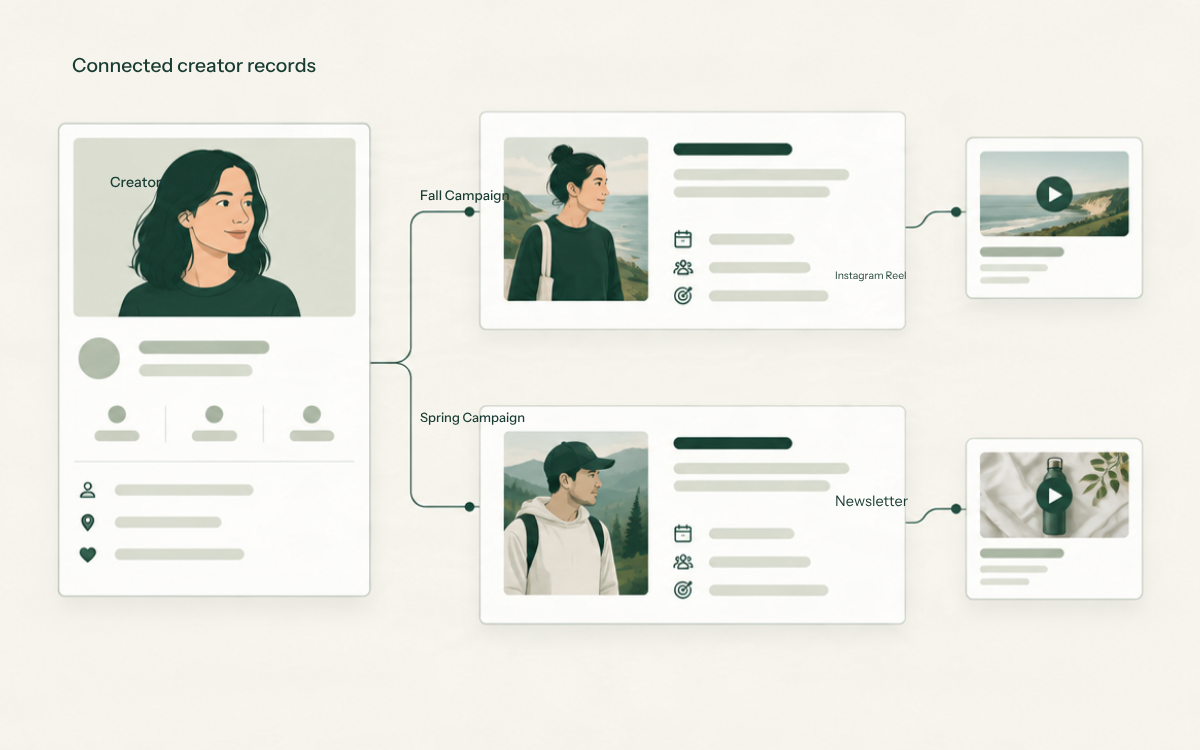
This becomes particularly important when working with an AI assistant.
If you ask, "Which creators still owe us content for our fall campaign?", your assistant needs enough information to connect each creator to their campaign and its outstanding deliverables.
The clearer your records, the more useful your AI assistant can be.
Step 2: Choose where your creator data lives
Once you've determined what information matters, the next step is deciding where to store it.
There isn't one right answer. A spreadsheet, a flexible workspace, or purpose-built creator marketing software can all be reasonable choices.
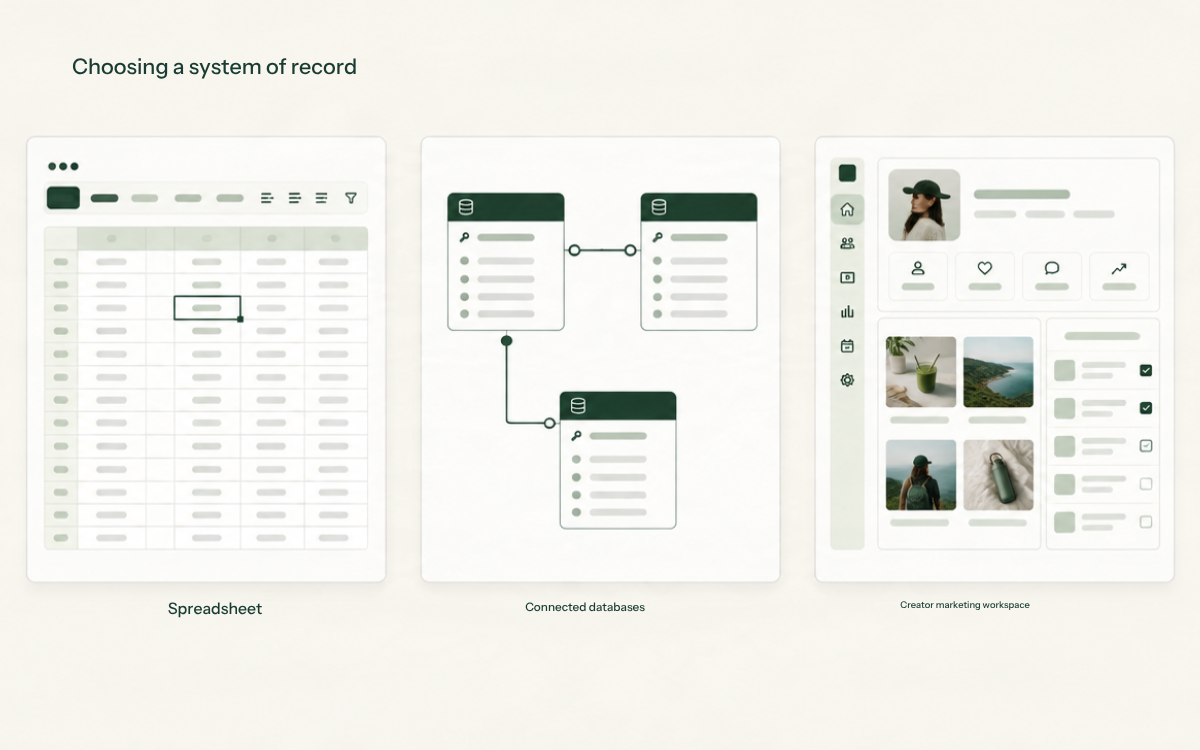
Option 1: Google Sheets — A familiar starting point
Google Sheets is a natural starting place for many creator marketing programs.
You could create separate tabs for creators, campaigns, creator partnerships, and deliverables, using consistent IDs to connect related records.
For example, your deliverables tab could contain:
| Creator | Campaign | Deliverable | Due date | Status |
|---|---|---|---|---|
| Sarah | Fall Launch | Instagram Reel | Oct. 22 | In progress |
| James | Fall Launch | TikTok Video | Oct. 24 | Planned |
| Maya | Holiday Campaign | YouTube Video | Nov. 5 | Confirmed |
Illustrative example; not actual creator records.
A spreadsheet like this can work well, particularly for a smaller program.
And with AI-powered spreadsheet tools and compatible connections, you may be able to ask questions about the data, organize information, and make supported updates without manually navigating every row.
The tradeoff is that spreadsheets still require care. Relationships between records, permissions, change history, and consistent status updates can become harder to manage as a program grows.
Option 2: Notion — More structure and flexibility
Notion offers another approach.
Rather than organizing everything into spreadsheet tabs, you can create connected databases for creators, campaigns, and deliverables.
These databases can include relationships, properties, and different views of the same information.
For example, you might maintain a creator database connected to a campaign database, then use a filtered view to see everyone participating in an upcoming launch.
Notion also offers connections to AI assistants, which can make information available through conversation and, where supported, allow updates.
The main consideration is setup. Notion offers considerable flexibility, but your team is still responsible for designing and maintaining a structure that reflects how your creator program works.
Option 3: Purpose-built creator marketing software
The third option is to use a platform designed specifically for creator relationships and campaigns.
Tools like CreatorMarketing.app provide a more structured starting point for keeping track of creators, campaigns, deliverables, gifting, and other creator-marketing work.
Instead of building and maintaining these relationships yourself, the software provides records and workflows designed around the work you're already doing.
When a platform also supports AI assistant integrations, it can provide another way to access and manage that information.
The advantage is less manual setup and more consistent records. The tradeoff is that specialized software may be less flexible for unrelated business processes.
The important point is that your AI assistant doesn't need to replace your existing tools. It needs a reliable way to work with them.
Step 3: Connect your data to ChatGPT or Claude
Once your creator information is organized, the next step is connecting it to your AI assistant.
Both ChatGPT and Claude support ways of working with external services.
Depending on the platform, these may be called apps, plugins, or connectors.
Some integrations use the Model Context Protocol (MCP), an open standard that allows AI applications to communicate with external tools and data sources.
You don't need to understand the underlying technology to benefit from it.
There are three things worth understanding:
1. Access to information
Your assistant needs permission to retrieve the relevant creator and campaign records.
For example, it might be able to look up creators in a spreadsheet or retrieve campaign information from a connected workspace.
2. Permission to make changes
Reading information and modifying it are two different capabilities.
Some connections allow an assistant to retrieve information but not change it. Others support actions such as creating records, updating statuses, or editing existing information.
Those capabilities depend on the integration, your account, and the permissions you've granted.
3. A way to confirm what happened
When your assistant makes a change, you should be able to confirm that the information was saved correctly in the underlying tool.
Getting connected
Start by checking which connections are available in your AI assistant.
For ChatGPT, review the available integrations in Settings → Plugins.
For Claude, open Customize → Connectors or use the connector controls within a conversation.
Choose the service that contains your creator information, review its permissions, and follow the connection process.
If your service isn't available directly, a compatible custom connection may be an option, although that can require additional setup. Availability depends on your plan and workspace permissions; check ChatGPT's custom MCP guide or the Claude connectors guide below before getting started.
After connecting, start with a simple request:
Show me the creators in our fall campaign.
If your assistant retrieves the expected records, you have a useful starting point.
For additional setup details, refer to the official ChatGPT connected apps documentation and Claude connectors guide.
Step 4: Start managing your creators through conversation
Now comes the interesting part.
Once your assistant has access to your records, you can begin using natural language to work with your creator program.
The easiest place to start is with questions about information you already have.
Find the information you need
Imagine preparing for a campaign meeting.
Instead of opening several spreadsheets or database views, you could ask:
Which creators are currently participating in our fall campaign?
Or:
Summarize our active creator partnerships and their current statuses.
If the necessary information is available, your assistant can help bring it together.
Identify what needs attention
You can also use your assistant to identify outstanding work.
For example:
Which creators have deliverables due this week?
Or:
Show me the creators we're waiting to hear back from.
These requests become particularly useful when creator relationships, campaigns, deliverables, and activities are connected.
They allow you to ask about the work that needs attention rather than manually reviewing every record.
Update your creator records
If your connection supports editing, you can begin making updates through conversation.
For example:
Update Sarah's status to confirmed for our fall campaign.
Or:
Add a note that James requested an extension on his deliverable.
Your assistant should identify the relevant record, make the supported change, and provide a clear result.
It's worth checking the underlying record afterward, especially when testing a new integration.
Coordinate multiple actions
Some integrations can support more involved workflows.
For example:
Add these three creators to our fall campaign and assign one planned Instagram Reel to each.
This type of request may involve several connected records.
Rather than treating it as a simple note, a capable integration can create campaign partnerships and associate the planned deliverables with the correct creators.
Whether this works depends on the actions the connected system exposes to your assistant.
That's an important distinction: an AI assistant can only reliably complete the actions its connected tools actually support.
Step 5: Keep your creator records reliable
Working through an AI assistant can make creator management more convenient, but it doesn't eliminate the importance of accurate records.
In some ways, it makes them more important.
Consider a few simple practices.
Maintain one reliable source of information
Avoid keeping competing versions of the same campaign or creator record in different places.
If your team updates a spreadsheet, Notion database, or creator marketing platform, that should be the authoritative place to check the current state of the work.
Verify important updates
When an assistant says it has updated a record, confirm the change was completed.
This is particularly important when coordinating several creator partnerships or making changes across multiple campaigns.
Review sensitive actions
Sending agreements, approving commissions, issuing payouts, and sending bulk communications can have real consequences.
These actions should have appropriate permission checks, previews, and approval steps.
Preserve the history
Knowing the current status of a creator partnership is useful.
Knowing what changed, when it changed, and why can be even more useful.
As your program grows, look for ways to preserve a dependable history of communication, commitments, and campaign activity.
An AI conversation can help you interact with your records, but it shouldn't be the only place that important information exists.
Conclusion: Your AI assistant doesn't need to be your database
AI assistants are changing how people interact with software, but that doesn't mean every business needs to abandon the tools it already uses.
For a smaller creator marketing program, a well-organized spreadsheet connected to an AI-powered workflow may be enough.
For teams managing more relationships, multiple campaigns, and increasingly complicated deliverables, structured tools like Notion or dedicated creator marketing software may provide a better foundation.
The underlying principle remains the same.
Keep your creator information in a reliable place, and use your AI assistant to make working with it easier.
That's the idea behind CreatorMarketing.app: providing a structured home for creator relationships, campaigns, and the work that happens along the way, with support for AI-assisted workflows.
The assistant you use may change. Your creator relationships and campaign history shouldn't have to.